
Claude asked for fourteen tool calls. My code ran every one of them. That gap between asking and doing is the key to understanding agents. An agent is a loop. The model asks for tools and your code decides whether to run them and when to give up.
To see that loop up close, I built a console app that sorts messages from a made-up dead-letter queue into categories based on their content. The app uses Anthropic’s official C# SDK and no agent framework. The full code is on GitHub. There is also a Java version built on Anthropic’s Java SDK. This post walks through the C# version.
What Makes It an Agent
“Agent” gets defined in several ways. Anthropic’s Building effective AI agents separates two designs. In a workflow, code sets the path ahead of time. In an agent, “LLMs dynamically direct their own processes and tool usage.”
In my app, the prompt asks Claude to triage seven messages. Claude chooses which tools to call. The app runs them and sends back the results. The API does not remember anything between calls. Each request from the app includes the full conversation history.
The Two Tools
I gave Claude two tools. get_dlq_message returns one message by its id from seven hard-coded messages that stand in for a dead-letter queue. There is no real queue behind it. classify records the category Claude picks for a message. Every request includes both tool definitions so Claude can decide which one to ask for.
Bad input and unknown tool names come back as a tool_result with is_error: true. This gives the model a chance to correct itself and try again. Tool input is model output, so I validate it like any other untrusted input.
| Tool | What it does | What can go wrong |
|---|---|---|
get_dlq_message(id) | Returns one fake message: error, delivery count, body | Unknown or missing id |
classify(id, category) | Records transient, poison, code-bug, or unknown | Unknown id, category outside the list |
The Loop
The heart of the console app is the agent loop. Claude decides whether to ask for another tool. The for loop calls Claude at most ten times. Without that limit, a confused or manipulated model could keep running up the bill.
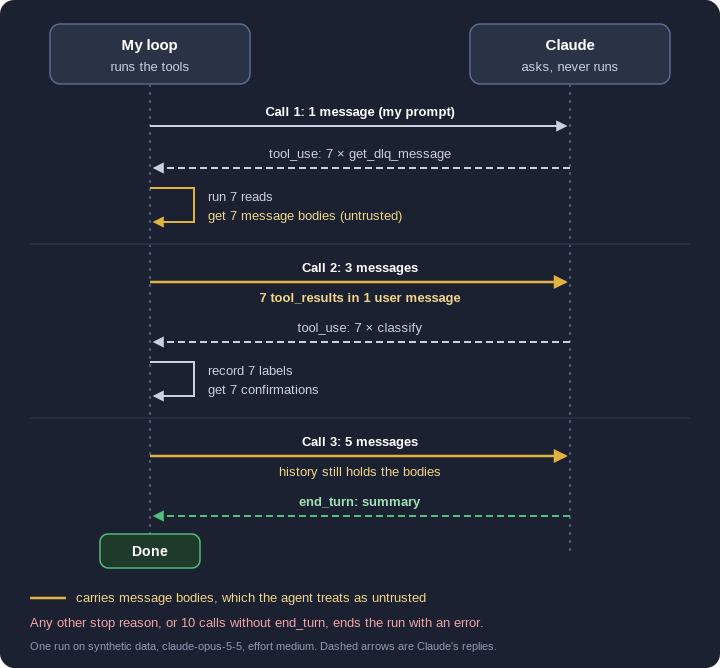
Here is how my run went:
- The loop sends the prompt and tool list through
createMessage, my wrapper around the SDK’sclient.Messages.Create. Claude asks for sevenget_dlq_messagecalls and stops withtool_use. Dispatchruns seven times and produces onetool_resultper request.- The loop sends the prompt, Claude’s reply, all seven results in one user message, and the tool list. Claude asks for seven
classifycalls and stops withtool_use. Dispatchruns seven more times, and the results go into another user message.- The loop sends the whole history and the tool list. Claude returns a text summary and stops with
end_turn. - The loop sees
end_turnand returns.
Trimmed from the real code (setup, request building, logging, stop checks, and block copying left out):
for (int iteration = 1; iteration <= MaxIterations; iteration++)
{
    // build the request: model, tools, and the whole conversation so far
    var response = await createMessage(request);

    // refusal, max_tokens, or any unexpected stop reason: throw before running tools

    // start two empty lists: assistantContent and toolResults
    foreach (ContentBlock block in response.Content)
    {
        // copy every block into the assistant turn
        if (block.TryPickToolUse(out ToolUseBlock? toolUse))
        {
            var result = tools.Dispatch(toolUse.Name, toolUse.Input);
            toolResults.Add(new ToolResultBlockParam
            {
                ToolUseID = toolUse.ID,
                Content = result.Content,
                IsError = result.IsError
            });
        }
    }

    messages.Add(new AssistantMessageParam { Content = assistantContent });

    switch (response.StopReason)
    {
        case "tool_use":
            messages.Add(new UserMessageParam { Content = toolResults });
            break;
        case "end_turn":
            return;
    }
}

throw new InvalidOperationException($"No end_turn after {MaxIterations} iterations; stopping.");
The same loop in Java (click to expand)
Trimmed from the real code (setup and logging left out):
for (int iteration = 1; iteration <= MAX_ITERATIONS; iteration++) {
    // conversation is a builder that holds the model, tools, and history
    MessageCreateParams request = conversation.build();
    Message response = createMessage.apply(request);

    // refusal, max_tokens, an unexpected stop reason, or an unknown block: throw before running tools
    StopReason stopReason = requireSupportedStopReason(response);
    requireSupportedContent(response);

    // the SDK adds the whole reply as the assistant turn
    conversation.addMessage(response);
    if (stopReason.equals(StopReason.END_TURN)) {
        return;
    }
    // run every tool call and send the results in one user message
    conversation.addUserMessageOfContentBlockParams(runTools(response, tools));
}

throw new IllegalStateException("No end_turn after %d iterations; stopping.".formatted(MAX_ITERATIONS));
Two rules matter here. Every tool_use needs a tool_result in the next user message and Claude’s reply goes back into the history unchanged with its thinking blocks included.
| Stop reason | What happens |
|---|---|
tool_use | Run the tools, send the results, call again |
end_turn | Done |
refusal | Stop and report the category |
max_tokens | Stop because the reply was cut off |
Anything else, such as pause_turn | Stop |
For the last three rows, the loop throws before running any tool.
The docs list more stop reasons than I handle. I fail on the rest instead of guessing.
One Real Run
- Totals: 3 API calls, 14 tool calls, 6,052 input and 1,768 output tokens, about 15 seconds.
- Cost: about $0.06 on
claude-opus-5-5at effortmedium($4 / $20 per million input / output tokens, pricing).
| Message | What I wrote it to be | What Claude said |
|---|---|---|
| SQL timeout | transient | transient |
| Truncated JSON | poison | poison |
| Null shipping address | code-bug | code-bug |
| 503 from a downstream service | transient | transient |
| Unknown event type | poison | poison |
| Quantity of zero, divide by zero | code-bug | code-bug |
| Empty order lines | ambiguous, expected unknown | code-bug |
What Surprised Me
The first surprise was how little back-and-forth this took. The fourteen tool calls needed only three round trips because Claude asked for seven get_dlq_message calls in one reply and seven classify calls in the next. Logging was also harder than I expected. Serializing the SDK’s request object logged a wrapper that included a headers field, and headers can carry credentials. The actual body is in request.RawBodyData. Those logs showed me that the history is the memory. Every request resends the whole conversation, so input grew from 621 tokens on the first call to 2,262 on the second and 3,169 on the third.
What This Doesn’t Mean
This task didn’t need an agent. The steps are fixed, so one call per message with structured output should do the job. It would also stop text in one message from influencing the label on another. I used the loop to learn how it works. Two runs gave the same labels but that’s too few to say how stable they are. This also isn’t production code. It has no retries of my own, no persistence, and no way to act on a label.
My Take
| Decision | What I chose | What it costs |
|---|---|---|
| Loop | Hand-written, no framework | More to get right yourself |
| Refusals | Stop, with no fallback model | One bad message ends the whole run |
| Conversation | One for all messages | Text in one message could influence labels on others |
| Tool input | Validate and return errors | A wrong but allowed label still passes |
| Logging | Full bodies, never headers | Only acceptable because the data is fake |
I’d write the loop by hand when I’m learning how agents work or need to control each step, such as checking the stop reason before any tool runs. For a routine agent without those needs, I’d try the SDK’s Tool Runner first.
This agent reads message bodies it didn’t write. It can also change state by recording labels. It has no private data and none of its tools can send anything out. The main risk is that a hostile message gets itself or another message the wrong label. It could also slant the written summary. That’s harmless here because the data is fake and the labels only live in memory. It would matter if a label decided whether a real message got resent or deleted. I haven’t attacked it with an injected message yet.
Summary
An agent is just a loop. My app made three round trips to Claude and ran the requested tools between calls until Claude ended its turn. Claude decided which tools to ask for and what label to give each message. My code decided whether to run each request, what input to accept, and when to give up.
The next step is to let the SDK’s Tool Runner drive the loop and then attack the agent with an injected message.
References
- Anthropic, Building effective AI agents (December 2024) - https://www.anthropic.com/research/building-effective-agents
- Anthropic, Tool use with Claude (Claude API docs) - https://platform.claude.com/docs/en/agents-and-tools/tool-use/overview
- Anthropic, Handle tool calls (Claude API docs) - https://platform.claude.com/docs/en/agents-and-tools/tool-use/handle-tool-calls
- Anthropic, Stop reasons and fallback (Claude API docs) - https://platform.claude.com/docs/en/build-with-claude/handling-stop-reasons
- Anthropic, Pricing (Claude API docs) - https://platform.claude.com/docs/en/about-claude/pricing
- Anthropic, C# SDK - https://github.com/anthropics/anthropic-sdk-csharp
- Anthropic, Java SDK - https://github.com/anthropics/anthropic-sdk-java
- ByteSizeBrews, dlq-triage-agent-dotnet (source code) - https://github.com/ByteSizeBrews/dlq-triage-agent-dotnet
- ByteSizeBrews, dlq-triage-agent-java (source code) - https://github.com/ByteSizeBrews/dlq-triage-agent-java